AI Agent — Spike Detection
Spike detection answers a question that the normal "known/unknown" check cannot: "This error is normal — but why is it happening 50 times a minute instead of the usual 2?"
Once a pattern is labeled known (either automatically after enough
sightings, or by you through the API), the agent stops writing it to
the shadow log. Spike detection brings it back when the volume
suddenly jumps well above the pattern's normal rate.
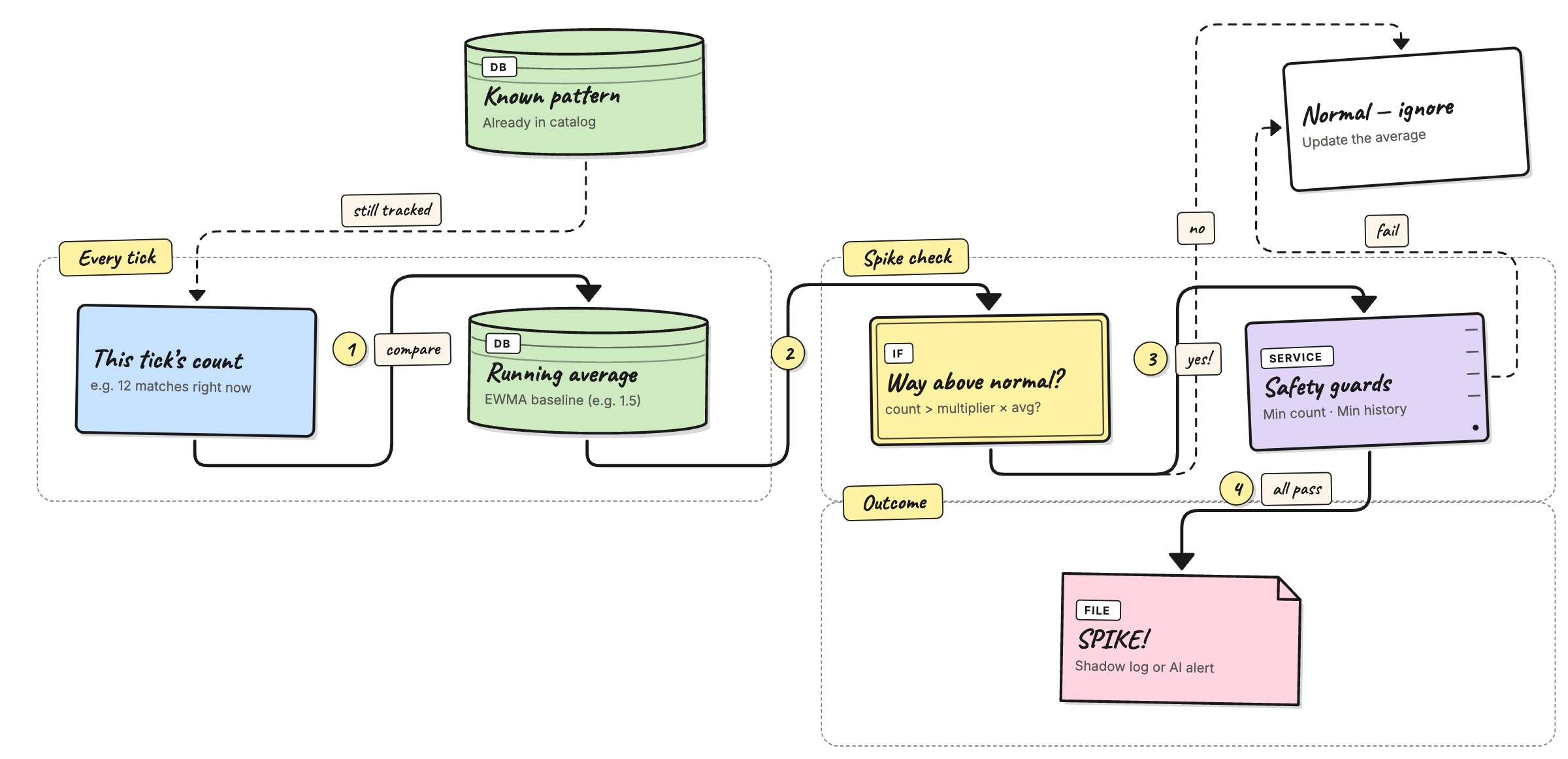
How it works
The agent keeps a running average for each pattern — specifically an EWMA (Exponentially Weighted Moving Average). Each time the agent polls for new logs, it updates the average with that tick's count, giving more weight to recent ticks and fading out older ones.
Before updating the average the agent takes a snapshot of the
current average and compares the incoming tick count against it. If
the tick count is far above the snapshot, the pattern is flagged as a
spike and written to the shadow log (or forwarded to the AI analyzer
in detect mode), even if it was previously known.
The comparison has three guards:
- The tick must be above a raw minimum — so a baseline of
0.5and a single-match tick doesn't look like a spike. - The pattern must have been seen enough times overall — so the first big burst from a brand-new pattern doesn't get mislabeled before any real average exists.
- The multiplier must be positive — setting it to
0turns the whole feature off.
All three must be true at the same time for a spike to be recorded.
Configuration
These three keys live under agent.catalog in config.yaml:
agent:
  catalog:
    spike_multiplier: 5.0        # how many times above average triggers a spike
    spike_min_frequency: 5       # tick must have at least this many matches
    spike_min_baseline_count: 20 # pattern must have been seen this many times overall
spike_multiplier
Default: 5.0
Think of this as a sensitivity dial. It answers the question: "How much bigger than normal does a burst need to be before I should care?"
If a certain error usually shows up about 2 times every time the
agent checks, and you set this to 5.0, the agent will only flag
it when it suddenly sees more than 5 × 2 = 10 of them in one
check. Anything below that is treated as normal noise.
- Set it higher (e.g.
8.0) if you're getting too many false alarms — only really big jumps will count. - Set it lower (e.g.
3.0) if you want to catch smaller surges earlier. - Set it to
0to turn off spike detection completely.
Examples:
| Normal rate | Multiplier | This check saw | Spike? | Why |
|---|---|---|---|---|
| 2 | 5.0 | 8 | No | 8 is under 10 (5 × 2) |
| 2 | 5.0 | 11 | Yes | 11 is over 10 |
| 2 | 3.0 | 7 | Yes | 7 is over 6 (3 × 2) — lower bar catches it |
| 2 | 0 | 100 | No | Feature is off |
| 1 | 5.0 | 6 | Yes | 6 is over 5 (5 × 1) |
spike_min_frequency
Default: 5
This is a minimum count. Even if the multiplier math says "that's a spike!", the agent will ignore it unless there are at least this many errors in one check.
Why? Imagine an error that almost never happens — say 0.4 times per check on average. If one check happens to have 3 of them, the math says that's 7.5× the normal rate. But 3 errors is probably just a coincidence, not a real problem. This setting stops the agent from overreacting to tiny numbers.
- Set it higher (e.g.
10) if your logs are noisy and you only want to hear about genuinely large bursts. - Set it to
1if you trust the multiplier alone to decide.
Examples:
| Normal rate | Multiplier | Min frequency | This check saw | Spike? | Why |
|---|---|---|---|---|---|
| 0.4 | 5.0 | 5 | 3 | No | 3 errors is under the minimum of 5 |
| 0.4 | 5.0 | 5 | 5 | Yes | 5 meets the minimum, and 5 > 2.0 |
| 1 | 5.0 | 10 | 8 | No | 8 errors is under the minimum of 10 |
| 1 | 5.0 | 10 | 12 | Yes | 12 meets the minimum, and 12 > 5 |
| 0.5 | 5.0 | 1 | 3 | Yes | Minimum is just 1, so the multiplier decides |
spike_min_baseline_count
Default: 20
The agent needs to see an error pattern enough times before it knows what "normal" looks like. This setting says: "Don't even try to detect spikes until you've seen this pattern at least N times total."
Think of it like a new employee. On their first week they have no idea what a busy day looks like. After a few weeks they know the difference between "a little more than usual" and "something is actually wrong". This setting is that learning period.
- Set it higher (e.g.
50) if you want the agent to learn longer before it starts judging. - Set it lower (e.g.
5) if you have low-traffic services where errors take a long time to add up.
Examples:
| Times seen so far | Min baseline count | This check saw | Spike? | Why |
|---|---|---|---|---|
| 3 | 20 | 30 | No | Only seen 3 times — still learning |
| 15 | 20 | 30 | No | Seen 15 times — not enough yet |
| 25 | 20 | 30 | Yes | Seen 25 times — ready to judge |
| 4 | 5 | 30 | No | Seen 4 times — almost ready but not yet |
| 100 | 20 | 30 | Yes | Well past the learning period |
Example
Say the error db-conn-refused normally shows up about 1–2 times
every check. After a few days of training, the agent's average
for this pattern settles at roughly 1.5.
With the default settings, a spike fires when the agent sees
8 or more of them in one check — because 8 > 5.0 (spike_multiplier) × 1.5 (baseline) = 7.5
and 8 ≥ 5 (spike_min_frequency: the minimum count) and the pattern has been seen more
than 20 times (spike_min_baseline_count) overall (so the agent trusts its average).
What the shadow log shows
A spike entry in shadow.json looks like this:
{
  "source": "app-logs",
  "pattern_id": "a3f1c2...",
  "template": "service=db-pool message=\"connection refused to database server <*> port <*>\"",
  "sample": "service=db-pool message=\"connection refused to database server db-07 port 5432\"",
  "rule": "db-errors",
  "verdict": "spike",
  "frequency": 12,
  "timestamp": "2026-05-04T14:23:01Z"
}
Key fields:
verdict: "spike"— tells you this is a volume event, not a new unknown pattern.frequency— how many times the pattern fired in that one tick.template— the learned template for the pattern (with variable parts replaced by<*>).
Read them with:
curl -H "X-Gateway-Secret: $SECRET" \
  http://localhost:3000/api/agent/shadow | jq '.[] | select(.verdict=="spike")'
Or check the aggregate counts:
curl -H "X-Gateway-Secret: $SECRET" \
  http://localhost:3000/api/agent/shadow/stats
Testing spike detection with the log generator
The repo ships a script that generates realistic test logs. It has a
--spike flag designed for this exact workflow.
Step 1 — Build a baseline
Generate enough logs for the agent to train a stable average.
The default is 2000 lines spread over several hours, which is enough
for most patterns to pass spike_min_baseline_count.
python3 scripts/generate_noisy_logs.py \
  --output data/logs/app.log \
  --lines 2000
Point the file source at data/logs/app.log and let the agent run in
training mode until the source is fully consumed. Check
GET /api/agent/status to confirm the catalog is growing.
Step 2 — Switch to shadow mode
docker stop versus-agent
docker run -d \
  --name versus-agent \
  ... \
  -e AGENT_MODE=shadow \
  ghcr.io/versuscontrol/versus-incident:latest
Wait for the agent to catch up. The status endpoint will show
cursor moving forward.
Step 3 — Inject a spike
Append a tight burst of one specific template to the same log file. The agent will read it on the next tick and compare it against the baseline it built in step 1.
# 80 db-conn-refused lines packed into ~16 seconds
python3 scripts/generate_noisy_logs.py \
  --append \
  --start-time now \
  --spike db-conn-refused \
  --spike-burst 80
What --spike does differently from a normal run:
- Ignores
--linesand emits exactly--spike-burstlines. - Uses
--spike-interval-min/--spike-interval-max(default 0.0–0.2 s) instead of the normal 1–5 s spacing so all the lines land in one or two poll ticks. - Optionally emits
--spike-context Nregular noisy lines first so the burst doesn't appear in an empty file.
Step 4 — Check the shadow log
curl -H "X-Gateway-Secret: $SECRET" \
  http://localhost:3000/api/agent/shadow \
  | jq '.[] | select(.verdict=="spike")'
You should see one or more entries with "verdict": "spike" and a
frequency equal to (or close to) your --spike-burst value.
Useful flags
| Flag | Default | What it does |
|---|---|---|
--spike NAME | — | Name of the template to burst. Use --list-templates to see all options. |
--spike-burst N | 50 | Number of lines in the burst. |
--spike-interval-min S | 0.0 | Minimum seconds between burst lines. |
--spike-interval-max S | 0.2 | Maximum seconds between burst lines. |
--spike-context N | 0 | Regular noisy lines to emit before the burst. |
--list-templates | — | Print all template names and exit. |
# See all available template names
python3 scripts/generate_noisy_logs.py --list-templates

# Inject an auto-picked random template
python3 scripts/generate_noisy_logs.py --append --start-time now \
  --spike auto --spike-burst 60

# Add 20 normal lines before the burst so there's some context
python3 scripts/generate_noisy_logs.py --append --start-time now \
  --spike panic --spike-burst 40 --spike-context 20
Tuning tips
- Too many spike alerts? Raise
spike_multiplier(e.g.8.0) orspike_min_frequency(e.g.10). - Missing real surges? Lower
spike_multiplier(e.g.3.0) orspike_min_frequency(e.g.3). - Spikes on new patterns? Raise
spike_min_baseline_countso the agent waits longer before it starts comparing. - Want to disable entirely? Set
spike_multiplier: 0.